Your Small Desk Isn't the Problem.

There’s always that one thing on a small desk that ruins everything. Not your laptop, not your keyboard… your lamp. It sits there… taking up way more room than it should.
You try to move it — it’s in the way. You push it back — now your desk feels cramped. You keep it — and somehow it controls your entire setup.
And the worst part? You actually need it. But here’s the shift most people don’t make: you don’t need to remove your light. You need to change how it exists on your desk.
In this guide, you’ll learn how to fix a desk lamp that takes up too much space using smarter lighting setups that free your desk — without sacrificing comfort.
Table of Contents
Some links here are affiliate links to Amazon. They cost you nothing extra and help support the site. I only ever link to things I’d actually use myself.
What’s the best way to light a small desk without a bulky lamp?
The best way to light a small desk is to replace bulky lamps with a space-saving desk lamp setup — clamp-on lamps, monitor light bars, or LED strips mounted off the desk surface. These solutions keep your workspace clear while providing focused, comfortable lighting.
What is a space-saving desk lamp, and which type fits a small desk?
A space-saving desk lamp is any lamp that lights your desk without eating your desk. Instead of a base that sits on the surface, it mounts off it — so you get the light and keep the space.
Three types do this well on a small desk:
- Clamp-on / arm lamps — clamp to the desk edge, swing where you need them, base-free.
- Monitor light bars — rest on top of your screen, light the desk, take up zero surface.
- Slim LED or wall-mounted lights — for soft, ambient light off the desk entirely.
Which one? If you read or write a lot, start with a clamp-on lamp. If you’re mostly on a screen, a monitor light bar is usually enough. Tight on edge space or renting? Slim LED or wall lighting keeps the desk completely clear.
Why does your desk lamp take up so much space?
Most desk lamps weren’t designed for small desks. They were designed for… desks with space. So when you place one on a narrow setup, it immediately becomes a problem.
You’ve probably experienced this:
- your mousepad gets squeezed
- your notebook has nowhere to go
- your lamp blocks part of your screen
And then you start adjusting everything around it. That’s the real issue. Your lamp becomes the center of your setup instead of your work. And beyond space, there’s another problem:
Bad lamp placement can:
- create glare on your screen
- cast shadows on your keyboard
- strain your eyes
So this isn’t just about space. It’s about comfort and focus.
If your lamp is already taking center stage, your desk is probably overloaded in more ways than one — clearing the surface first makes every other fix easier.”
→ How to Free Up Space on a Small Desk
What’s the best strategy to light a tiny desk?
The best approach is to switch to slim, space-saving lights and move them off the desk surface—using clamps, monitor-mounted lights, or wall-mounted solutions—while adding soft ambient lighting to balance the setup.
Start with a space-saving task light
This is your main light. And it shouldn’t sit on your desk.
Best options:
- clamp-on desk lamp (adjustable arm)
- monitor light bar (no base at all)
Both remove the biggest problem: the base, and instantly free space.
Add ambient light so your desk doesn’t feel harsh
This is where most people get it wrong. They remove the lamp… and suddenly everything feels too dark — or too harsh. So they bring it back.
Instead:
- use a ceiling light
- or LED strips
- or a floor lamp nearby
This lets your main light stay small and focused.
Adapt your lighting to your setup
Your desk position changes everything.
- against a wall → clamp or wall light works best
- corner setup → side-mounted lamp
- dual monitors → light bar or overhead lighting
There’s no universal setup. Only what fits your space.
Solution 1 — Switch to clamp-on or arm-style lamps
Clamp-on lamps are one of the best upgrades for small desks because they attach to the edge instead of sitting on the surface, freeing up valuable workspace while staying fully adjustable.
How to choose the right clamp lamp
Not all clamp lamps are equal.
Look for:
- strong clamp grip (important for thin desks)
- adjustable arm reach
- dimmable brightness
- adjustable color temperature (warm → cool)
If it’s too stiff or too weak … you’ll stop using it properly.
A solid match for that list: the Voncerus LED Desk Lamp with Clamp. It clamps to the edge, so your surface stays clear. The arm bends where you need it, and you get adjustable brightness and color temperature, warm to cool. Slim, no bulky base.
How to install it (without ruining your setup)
Keep it simple:
- Choose a side or back corner
- Clamp it securely (not too tight)
- route the cable along the back edge using clips
- angle the light at ~45° toward your workspace
That angle matters more than people think. It reduces shadows, glare and eye strain.
When to use wall-mounted or shelf-mounted lamps
If your desk is really small… even a clamp might feel like too much.
That’s where this shines:
- wall-mounted swing arm
- shelf-mounted lamp above your desk
This removes everything from your desk. Zero footprint. Maximum space.
While you’re routing your lamp cable along the back edge, it’s the perfect moment to clean up the rest of your cable situation — both problems share the same fix.
→ How to Hide Cables on a Small Desk Setup
Solution 2 — Use monitor light bars and slim lamps
Monitor light bars and slim LED lamps provide focused lighting with almost no footprint, making them ideal for very small desks where every inch matters.
When a monitor light bar is the best choice
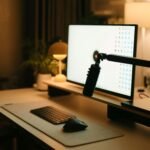
This is one of the cleanest solutions. A monitor light bar sits on top of your screen and lights your desk. No base. No clutter. And something interesting happens: Your desk suddenly feels empty. In a good way.
If that’s the look you want, the Quntis Monitor Light Bar is one compact option. It rests on top of your screen, lights your desk, and adds nothing to the surface. It auto-dims to your room.
Choosing a slim LED lamp (if you prefer a classic setup)
If you still want a desk lamp: Go smaller.
Look for:
- narrow base footprint
- tall adjustable neck
- dimmable, so you can match it to the room
And place it: back corner only, never in the center.
Real setups (what it actually looks like)
Setup 1: Monitor + light bar
- no desk lamp
- clean surface
- minimal cables
Setup 2: Laptop + slim lamp behind stand
- front area stays clear
- light comes from behind
Both feel instantly more spacious.
Solution 3 — Replace your lamp completely (LED + wall lighting)
You can completely remove your desk lamp by using LED strips and wall or overhead lighting to create a layered lighting setup that keeps your desk clear and comfortable.
Use LED strips for soft lighting
Place them:
- behind your monitor
- under a shelf
- along the back edge
They don’t light your desk directly. They reduce contrast. Which makes everything easier on your eyes.
Add a main light from above or the wall
Use:
- wall light
- ceiling light
- directional spotlight
This becomes your main light source. Your desk stays empty.
Simple transition (step-by-step)
- Add LED strips
- test brightness at night
- add a main overhead light
- remove your desk lamp
You’ll immediately feel the difference.
Tools that make small desk lighting easier
You don’t need multiple lamps. You need the right setup. If you don’t want to overthink it, here are the few tools that actually make a difference.
A few well-chosen lighting tools—like clamp lamps, monitor light bars, and LED strips—can completely replace bulky desk lamps and free up valuable space on a small desk.
What actually works
- clamp-on lamps → flexible + space-saving
- monitor light bars → zero footprint
- LED strips → ambient comfort
- wall-mounted lamps → no desk usage
How to choose
Ask yourself:
- Does it free space or take it?
- Does it improve comfort?
- Does it fit my desk layout?
If not → skip it.
Common mistakes when trying to save desk space with lighting
Using a large decorative lamp
Looks nice. Destroys your space.
Placing the lamp in the center
Worst possible position. Always move it to the edge or off the desk.
Lighting your screen directly
This causes glare. Angle matters.
Removing your lamp without replacing light
Then your setup feels worse. Layer your lighting.
Ignoring cables
Even a small lamp can feel messy with bad cable management.
FAQ
Can I use only a monitor light bar?
Yes, for most setups it’s enough. Especially in small spaces.
What brightness is best?
Bright enough to light your work area without out-shining your screen. That depends on your room, so look for a lamp you can dim rather than a fixed number.
How do I avoid shadows?
Position light from the side and angle downward.
Are clamp lamps safe on thin desks?
Yes, if the clamp is well designed and not overtightened.
What if I can’t drill into walls?
Use clamp lamps or light bars — both are renter-friendly.
What’s the best space-saving desk lamp for a small desk?
No single best — it depends on your desk. Clamp-on for flexible light, a monitor light bar for zero surface used, slim LED or wall light if you can’t clamp or drill.
Conclusion
Your lamp isn’t the problem.
The way it’s placed is.
Once you:
- move it off your desk
- or replace it with something slimmer
You don’t just gain space.
You gain comfort.
And once your lighting stops taking space, your desk finally feels like it belongs to you again.
And once your lighting is sorted, the next upgrade that makes the most immediate difference is getting your storage structure right.”
→ Best Desk Organizers for Small Desks