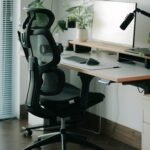
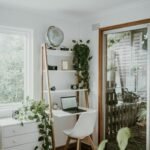
Your Small Desk Isn't the Problem.

Your small desk isn’t actually the problem – but it can definitely feel like it.
There’s a moment you probably know too well. You sit down, ready to work… and before you even start, you’re already rearranging things. Your mouse hits your notebook, your coffee has nowhere to go, and your cables are somehow everywhere. Again.
So the thought comes naturally: “I just need a bigger desk.” In most cases, that’s not true. It’s not that your desk is too small… it’s that your setup is taking up more space than it should.
Once you fix that, everything changes. The desk feels lighter, cleaner, easier to focus on.
In this guide, you’ll learn how to free up space on a small desk with simple, practical changes, without replacing your desk, overcomplicating your setup, or turning your space into a full DIY project.
Table of Contents
Some links here are affiliate links to Amazon. They cost you nothing extra and help support the site. I only ever link to things I’d actually use myself.
How can I quickly free up space on a small desk?
To quickly free up space on a small desk, take everything off the surface and put back only your daily essentials, usually just your laptop or keyboard and mouse, plus one notebook. Anything you use weekly or less should live somewhere else. Then work in one direction: go vertical before you go wider. Lift your screen to eye level with a monitor arm or laptop stand so the space underneath opens up, add a narrow wall shelf or pegboard for the things you reach for often, and use the area under the desk (a clamp-on drawer or tray) for what you want out of sight. Finish by shrinking what’s left: a compact keyboard, a single desk mat to keep the setup from spreading. The point isn’t a bigger desk. It’s keeping your main working zone clear.
Why do small desks get cluttered so fast?
Small desks get cluttered quickly because they have very limited space but are expected to handle too many things at once. A small desk doesn’t get messy because you’re disorganized. It gets messy because it’s forced to do too many jobs at once.
Think about it. For most people, a small desk is a workspace, a charging station, a storage area, sometimes even a nightstand. Everything ends up in the same place. Add no drawers, extra tech (laptop, monitor, chargers), and a stack of “I might need this later” items, and suddenly you have almost no usable space left.
And it’s not just visual. It starts changing how you work: you feel slower, more distracted, a little overwhelmed before you even begin.
Solution 1: What should actually live on your desk?
The fastest way to free up space on a small desk is to reduce what lives on it permanently. Most clutter doesn’t come from a lack of organization. It comes from too many things staying on the surface and trying to live there permanently.
The fix isn’t better organization. It’s better selection.
Step 1: Do a 10-minute desk reset
Here’s what works (and yes, it’s a bit brutal):
- Take everything off your desk
- Put it on your bed or the floor
- Start sorting
You’ll quickly see 3 groups:
- Daily tools → laptop, mouse, keyboard, notebook
- Weekly tools → chargers, books, accessories
- Occasional items → paperwork, random stuff
Only the first group earns space on your desk. Everything else? It needs a new home.
Step 2: Create an “active zone” and “parking zones”
This is where most people get it wrong. Your desk shouldn’t be fully used. It should be mostly empty in the center, with two kinds of space around that:
- Active zone = where your hands actually work
- Parking zones = edges, risers, vertical areas
A student setup might keep the laptop in the center, a notebook tucked under a small riser, and pens grouped on one side. A remote-worker setup might keep the keyboard and mouse in the center, the monitor lifted to free up the space underneath, and everything else moved off the surface.
If your desk has no drawers, even a compact desk organizer with a few compartments and a small drawer is often enough to keep your daily essentials in one place and create an instant “parking zone.” Once you see this, you can’t unsee it.
Step 3: Set rules that keep your desk clear
If you don’t set rules, clutter comes back. I’ve learned this the hard way: I’ll strip my whole desk down to the essentials, and it feels great at first… then the clutter creeps back faster than you’d think, and I’m right where I started. The reset alone never held. Rules did.
Simple ones work best:
- One notebook at a time
- One pen holder max
- No “temporary” items (they always stay)
And one habit that does most of the work: a 2-minute reset before you leave your desk. That’s it.
Quick tip: if you don’t use something at least once this week, it probably shouldn’t stay on your desk.
Solution 2: How can you use vertical space to free up a small desk?
The most effective way to free up space on a small desk is to use vertical and hidden areas instead of relying only on the surface. When you move items off your desk and into the space around it, your workspace instantly feels larger and more usable.
Reality check: most small desks don’t feel small because of their size. They feel small because too much stays on the surface. If your desk is small, the answer isn’t horizontal. It’s vertical.
The moment you stop asking “where can I put this?” and start asking “where can I move this off the desk?”, everything changes.
Step 1: Add a shelf above your desk
Even a single narrow shelf can transform your setup. Place it just above eye level, close enough to reach, but not so high it’s annoying. Use it for notebooks, small containers, everyday accessories. Suddenly, your desk breathes again.
Even a minimal wall shelf can free up a surprising amount of desk space without changing your setup.
Step 2: Use pegboards or rails for flexible storage
This is one of those upgrades that feels small… but makes a real difference. Instead of the drawers you don’t have, you can hang your headphones, store your cables, and keep tools visible but off the surface. It works especially well if your desk has no storage, or you’re in a dorm or small room.
A simple pegboard or rail system lets you move frequently used items off your desk while keeping them within reach. And bonus: it adapts as your setup evolves.
Step 3: Don’t ignore what’s under your desk
Most people completely waste this space. But this is where things get interesting. You can hang a small tray, add a clamp-on drawer, or mount cable trays underneath. Under-desk storage is one of the fastest ways to clear visible clutter without losing access to your essentials. One small upgrade here can clear a whole cluster of small items off your desk at once.
If a PC tower already lives down there, it decides how much of that space is left over. Here’s where to put a PC tower on a small desk, and how to measure what your legs actually take up first.
And if you’re not sure where to start with that second level, the simplest no-drill option is a clamp shelf. Here’s how to choose the right one for your desk size.
Solution 3: How can you fit a full setup on a small desk without feeling cramped?
To fit a full setup on a small desk, you need to use vertical stacking, prioritize your main screen, and reduce the footprint of everything else. The goal isn’t to remove your gear. It’s to organize it so it takes less space.
Here’s the shift: you don’t need less gear, you need smarter positioning.
Step 1: Choose your main screen
Everything revolves around this one choice. If you use a monitor, center it; if you work off a laptop, raise it to eye level, about an arm’s length away. That single move already clears a surprising amount of visual clutter.
A simple monitor arm or laptop stand can instantly free up space by lifting your screen off the desk. I use both on my own setup, and honestly, I’d never thought of them as space-savers, but getting the screens off the surface is exactly what opened it back up.
Step 2: Stack your setup vertically
This is where space is created. The first time you lift your screen, something clicks. You suddenly have space underneath: room for your keyboard, a place for your notebook. Same with a laptop stand: the laptop goes up, the keyboard stays in the active zone. And just like that, the space your screen used to take is yours again.
Step 3: Reduce the footprint of everything else
Small desk, small gear. That means a compact keyboard, a smaller mouse, minimal speakers or a soundbar. One trick that works surprisingly well: use a single desk mat. It visually contains your setup and stops everything from spreading everywhere.
Keeping your setup visually “contained” is just as important as physically saving space. Before, everything sits on your desk. After, only the essentials stay on the surface, and everything else is lifted or moved away.
What tools actually help free up space on a small desk?
The best tools to free up space on a small desk are the ones that reduce surface clutter, use vertical space, and add storage without increasing footprint. You don’t need a lot. You just need the right few.
The essentials (that make the biggest difference)
- monitor riser or arm → creates space underneath
- laptop stand → adds a second level
- cable clips or tray → removes visual chaos
- small organizer → prevents “floating items”
- clamp-on drawer → adds storage instantly
These tools work because they either move things off your desk or make better use of the space you already have.
How to choose (so you don’t make it worse)
Here’s the rule most people ignore: if the accessory is too big, it defeats its purpose. Always check:
- footprint vs desk size
- multi-function use
- mounting method (especially if renting)
Clean setups aren’t built by adding more. They’re built by adding better.
Simple setups based on your situation
If you’re just getting started: one organizer, basic cable clips, maybe a small shelf. If your desk has zero built-in storage: a monitor riser, a pegboard, a rolling drawer. If you want it to look clean and minimal: a monitor arm, hidden cable management, and nothing extra.
The goal isn’t to copy a perfect setup. It’s to build one that fits your space.
What are common mistakes that make a small desk feel even smaller?
Most small desks don’t feel cramped because of their size, but because of a few common mistakes that slowly reduce usable space. Most people don’t actually lack space. They lose it.
Keeping everything “just in case”
This one kills your desk. If you don’t use it this week, it doesn’t belong on your desk.
Ignoring vertical space
Walls are free real estate. Use them.
Using bulky accessories
A big lamp on a small desk? That’s half your space gone.
Letting cables take over
Cables don’t just look messy, they actively eat into your usable workspace. If that’s your main issue right now, fixing this one thing alone changes how your desk feels. Here’s how to hide cables on a small desk setup.
No reset habit
Clutter doesn’t appear overnight. It accumulates silently. Two minutes a day keeps it from piling up. And if your desk has no drawers to put any of it in, here’s how to organize a drawer-less desk.
FAQ
How do I organize a small desk if I share it?
Split the desk into one zone per person and give each their own container (a small tray or caddy) so supplies don’t drift across the line. The rule that keeps a shared desk clear: one defined home per person, not a shared pile.
What if I have a printer but no space?
Don’t keep your printer on a small desk unless you use it constantly. Move it to a side table, shelf, or rolling cart so your main workspace stays clear.
How do I stop paperwork from piling up?
Use a single tray or a vertical file holder, and keep only the current week’s papers in it, upright rather than stacked flat. File or toss everything older. Papers without a dedicated home always end up taking over the desk.
Is a wall-mounted desk better for small spaces?
A wall-mounted (floating) desk frees up floor space, but it almost never comes with drawers, so plan storage before mounting: a shelf above, a clamp-on tray below, or a pegboard beside it. Without that, a floating desk clutters just as fast as any other.
How often should I declutter a small desk?
Do a quick reset daily and a full reset once a week. If clutter keeps coming back, it usually means your setup needs to be simplified.
Your small desk was never the problem
Freeing up space on a small desk doesn’t require a bigger setup. Just a better one. You don’t need a bigger desk. You need clearer rules, a smarter layout, and better use of the space around you.
Start simple: do a 10-minute reset, add one vertical solution, fix one problem at a time. And you’ll notice something quickly. It’s not just your desk that feels better. It’s your focus.
Once your space is cleared, the next step is building a setup that stays that way. This is the complete system most people use.